
The Rise of Hybrid CPU-GPU Inference: When and How to Offload Layers Effectively
The Efficiency Frontier in Local AI
As local AI models grow more capable, they also grow larger, often straining the memory of even high-end consumer GPUs. The once-simple question of “can my GPU run this model?” has evolved into a more nuanced optimization challenge. The answer increasingly lies not in choosing between CPU or GPU, but in strategically leveraging both. Hybrid CPU-GPU inference—intelligently splitting a model between the faster processing of the GPU and the abundant memory of the CPU and RAM—has emerged as a critical technique for running large models efficiently on limited hardware. This approach represents the new efficiency frontier, transforming machines once considered underpowered into capable AI workstations and serving as a vital bridge to scalable, cost-effective local deployment.
Why Hybrid Inference? Beyond the GPU Memory Wall
The primary driver for hybrid inference is the GPU memory wall. A model must fit within the VRAM of your graphics card to run entirely on the GPU, which offers the fastest possible inference. When a model exceeds this limit, the traditional solution was to run it entirely on the CPU, which, despite having more system RAM, processes computations orders of magnitude slower, leading to unusable latency.
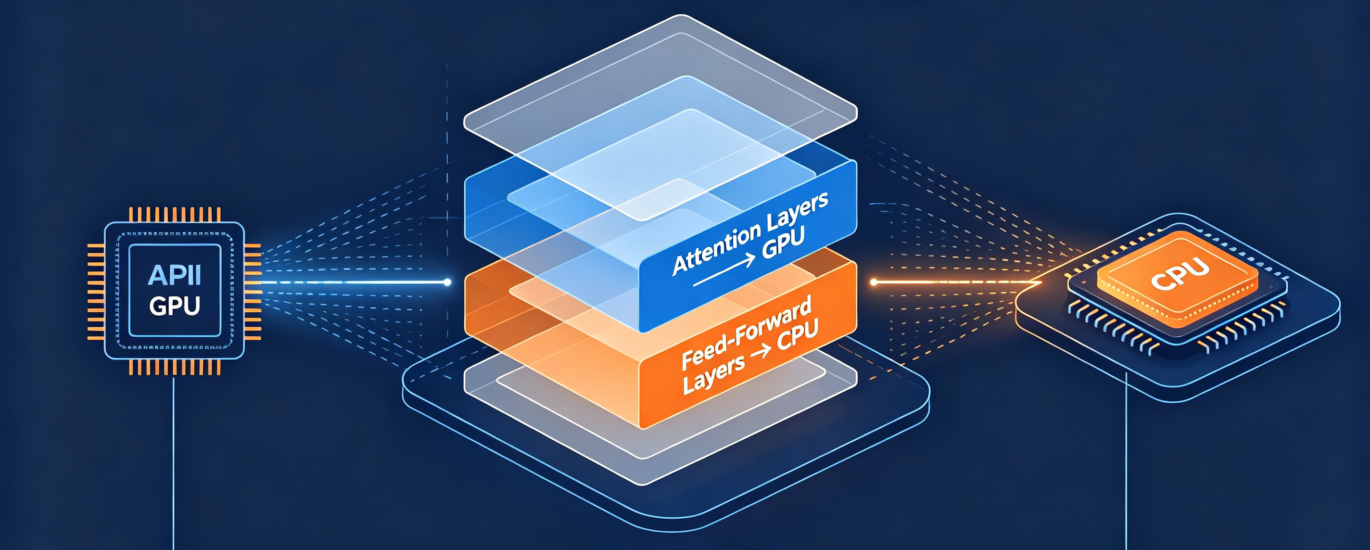
Hybrid inference elegantly solves this dilemma. By loading only the most computationally intensive layers of a model onto the GPU and keeping the rest in system RAM for the CPU to handle, you can run models much larger than your VRAM would normally allow, while retaining much of the GPU’s speed benefit.
The Core Analogy: Think of it like a specialized kitchen. The GPU is your superstar chef (incredibly fast at specific tasks but with limited workspace—the VRAM). The CPU is the team of prep cooks (slower individually but with access to the entire pantry—system RAM). Hybrid inference is the kitchen manager strategically deciding which tasks (model layers) the star chef handles and which go to the prep team to maximize overall meal output.
The Strategic “When”: Scenarios for Hybrid Offloading
Hybrid inference isn’t always the optimal choice. Use this decision framework to identify when it provides the greatest advantage.
| Scenario | Recommended Approach | Rationale |
| Model Size > VRAM | Hybrid Inference | The quintessential use case. Enables running models 20-50% larger than your VRAM with a manageable performance penalty vs. full CPU. |
| Prioritizing Throughput | Full GPU Inference | If your model fits entirely in VRAM, keep it there. Maximizes tokens/second. |
| Maximizing Model Size | Full CPU Inference | For running the absolute largest model possible on a system with very limited VRAM but ample RAM, despite slow speed. |
| Serving Multiple Models | Hybrid + Full GPU | Use hybrid for a large, less-frequent model while keeping a smaller, high-demand model fully loaded on GPU. |
| Energy/Heat Constrained | Conservative Hybrid | Offload more layers to CPU to reduce GPU utilization and power draw, trading some speed for efficiency. |
Key Indicator: If you encounter “out of memory” errors when trying to load a model with tools like Ollama or llama.cpp, hybrid offloading is your next logical step.
The Practical “How”: Implementing Layer Offloading
The implementation is thankfully becoming more accessible, primarily managed through a single parameter: ngl (number of GPU layers) or its equivalent in various tools.
- Using Ollama: The Simplest Method
Ollama has built-in support for layer offloading. When running or creating a model, you specify how many of its layers to place on the GPU.
| # Run a model, offloading 40 of its layers to the GPU
ollama run llama3.1:8b –num-gpu-layers 40
# To make this permanent, create a Modelfile FROM llama3.1:8b PARAMETER num_gpu_layers 40 PARAMETER num_thread 8 # Can also optimize CPU threads |
How to find the right number? Start with a high number (like 50). If it fails with a VRAM error, decrease it incrementally. Tools like nvtop (Linux) or Task Manager Performance tab (Windows 11) can help you monitor VRAM usage in real time.
- Using llama.cpp: Granular Control
The main binary in llama.cpp offers precise control via the -ngl flag and is excellent for benchmarking.
| # Benchmark a model with different offload strategies
./main -m mixtral-8x7b.Q5_K_M.gguf -n 512 -ngl 0 –prompt “Hello” # CPU only ./main -m mixtral-8x7b.Q5_K_M.gguf -n 512 -ngl 20 –prompt “Hello” # 20 layers on GPU ./main -m mixtral-8x7b.Q5_K_M.gguf -n 512 -ngl 40 –prompt “Hello” # 40 layers on GPU |
- Advanced Tuning: Finding the Sweet Spot
The goal is to find the performance “knee” in the curve—the point where adding more GPU layers yields diminishing returns.
- Profile Systematically: Measure tokens/second (t/s) for different ngl values (e.g., 0, 10, 20, 30, 40). Use a consistent prompt length.
- Monitor Resources: Watch your VRAM usage hit just below its maximum (e.g., 23.8 / 24 GB). This is your practical limit.
- Consider Model Architecture: Not all layers are created equal. Earlier layers often benefit more from GPU offloading. The last ngl layers are sent to the GPU.
A Rule of Thumb: A good starting point is to offload enough layers to fill 80-90% of your available VRAM, leaving a small buffer for overhead.
Performance Expectations and Trade-offs
Understanding the performance curve is crucial for setting realistic expectations.
- The Curve is Not Linear: The first layers offloaded to the GPU provide the biggest speed boost. Each additional layer offers a smaller incremental gain. Moving from 0 to 20 GPU layers might triple your speed, while moving from 20 to 40 might only increase it by 50%.
- The Communication Cost: Data must travel between the CPU’s RAM and the GPU’s VRAM over the PCIe bus. This overhead is why hybrid inference is slower than full GPU. A PCIe 4.0 x16 interface is significantly better for this than an older or slower bus.
- Quantization is Your Friend: Using a quantized model (like Q4_K_M) is perhaps the most effective strategy. It reduces the model’s memory footprint, allowing more layers to fit on the GPU, directly improving hybrid performance.
The Bridge to Scaling: From Single Machine to Cluster
Mastering hybrid inference on a single machine lays the groundwork for more advanced scaling concepts:
- Multi-GPU Inference: The logical next step. Instead of splitting layers between CPU and one GPU, frameworks like tensor_parallel in vLLM can split them across multiple GPUs, scaling both memory and compute.
- Edge Orchestration: In an edge computing network, different models or layers could be distributed across various devices (a powerful gateway GPU, lighter endpoint CPUs), all managed by a central orchestrator—a macro version of hybrid inference.
- Optimized Hardware Stacks: Understanding the CPU-GPU interplay informs better hardware purchases. It highlights the value of not just a powerful GPU, but also a CPU with high single-thread performance, fast RAM (DDR5), and a motherboard with a high-bandwidth PCIe bus.
Conclusion: Unlocking Capability with Strategic Compromise
Hybrid CPU-GPU inference is the art of the intelligent compromise. It accepts a trade-off in raw speed to achieve a far more important goal: making advanced AI capabilities accessible on existing, limited hardware. It democratizes access to larger, more powerful models without requiring a quantum leap in GPU memory.
As the local AI field pushes toward larger multimodal and reasoning models, techniques like layer offloading will only grow in importance. By understanding and implementing this strategy, you stop seeing your hardware as a fixed constraint and start treating it as a flexible resource to be optimized. This mindset is the true bridge from running isolated models to building scalable, resilient, and efficient local AI systems.
Finding the optimal configuration for your specific models and hardware can be a complex tuning exercise. The infrastructure experts at LocalArch.ai specialize in performance profiling and optimization for on-premise AI systems. Contact us to ensure your local setup is delivering maximum efficiency and capability.