Scaling Your Home AI Lab: From Single GPU to Multi-Node Distributed Inference
The Evolution from Workstation to Private AI Cluster
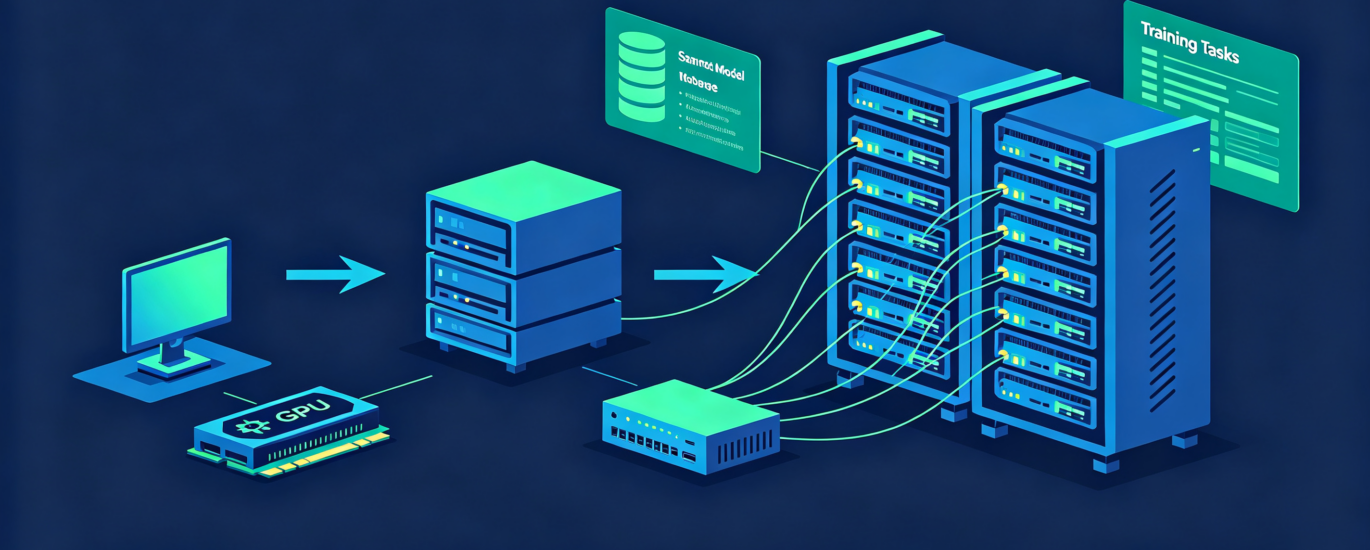
Throughout the year, we’ve guided you from building a balanced single-GPU system to virtualizing it and establishing governance. Now, as we enter the latter part of 2026, many power users face a new challenge: the single server, no matter how powerful, has reached its limit. Whether you’re hitting GPU memory walls with massive models, needing to serve multiple users concurrently, or simply pushing the boundaries of what’s possible in a private lab, the logical next step is distributed inference. This advanced guide moves beyond the single machine, exploring how to scale your home AI lab horizontally by connecting multiple nodes—transforming your collection of hardware into a cohesive, powerful private cluster capable of tackling workloads once reserved for cloud vendors.
Why Scale Horizontally? The Case for Multi-Node Inference
Before diving into the “how,” it’s essential to understand the “why.” Scaling out (adding more machines) versus scaling up (adding bigger hardware) offers unique advantages for the advanced user:
- Overcoming Memory Limitations: The most straightforward reason. Techniques like model parallelism can split a single 70B or 120B+ parameter model across the VRAM of multiple GPUs, even if they’re in different machines, making previously “unrunnable” models accessible.
- Maximizing Throughput for Serving: When you need to serve a high volume of requests (e.g., for an internal chatbot used by a large team), you can use pipeline parallelism to process different requests on different nodes, or use multiple replicas of a model for load balancing.
- Cost-Effective Utilization of Heterogeneous Hardware: A cluster allows you to pool the power of different machines—a powerful primary server with an RTX 6000 Ada, an older gaming PC with a 3090, and even an Intel NUC with an ARC GPU. Each can handle workloads suited to its capability.
- High Availability and Resilience: With a multi-node setup, you can design your system so that if one node fails, others can take over, ensuring critical AI services remain available.
Architectural Blueprint: Pathways to a Distributed Lab
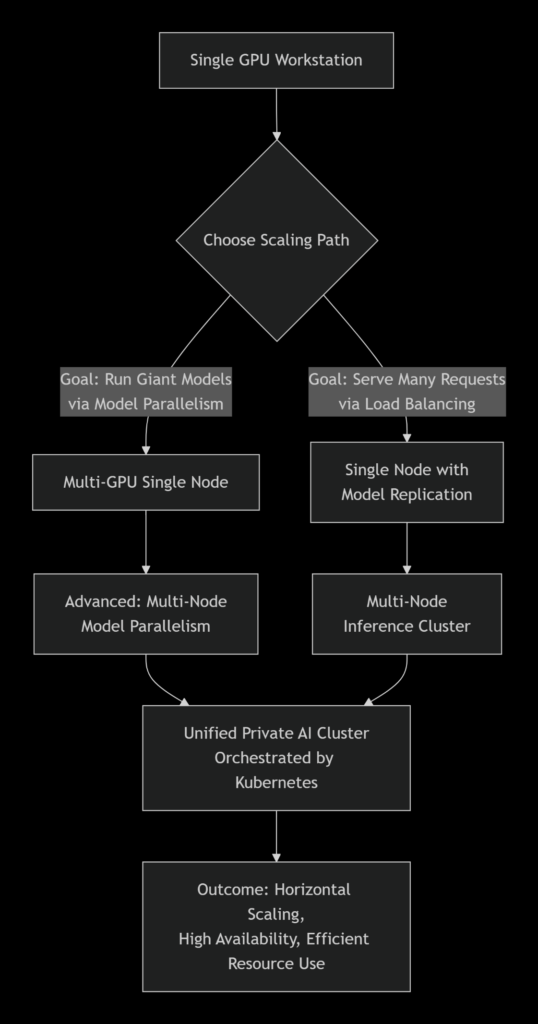
There is no single “right” way to build a cluster. Your path depends on your primary goal. The following diagram illustrates the main architectural pathways from a single GPU to a distributed inference cluster:
Pathway 1: Model Parallelism for Giant Models
This is for users who need to run models larger than any single GPU’s memory. Frameworks like Tensor Parallelism in vLLM or DeepSpeed split the model’s layers, attention heads, or weights across devices. Communication between GPUs (via NVLink or PCIe) is critical for performance.
Tool Highlight: vLLM with Tensor Parallelism
vLLM has become a gold standard for high-throughput serving and now excels at distributed inference.
| # Example: Serving a model across two GPUs on the same machine
python -m vllm.entrypoints.api_server \ –model meta-llama/Llama-3.1-70B-Instruct \ –tensor-parallel-size 2 \ –gpu-memory-utilization 0.9 \ –port 8000
# To extend across nodes, you’d use a –distributed-worker flag # and configure a Ray cluster (vLLM’s distributed backend) |
Pathway 2: Multi-Node Inference for Serving & Load Balancing
This is ideal for applications with many users. You run multiple copies (replicas) of your model on different machines and place a load balancer in front of them.
The Core Stack: Orchestration + Serving + Routing
- Orchestration: Kubernetes (K3s/K8s). Lightweight K3s is perfect for a home lab. It manages deploying your AI containers, scaling replicas up/down, and handling failures.
- Serving: Ollama or vLLM in containerized form. Each runs in its own Pod.
- Routing/API Gateway: Traefik or Nginx. This sits in front of your cluster, receives all user requests, and distributes them evenly to healthy model replicas.
Implementation Guide: Building a Two-Node K3s Cluster
Here is a condensed guide to setting up a basic, functional cluster. We’ll assume you have two Linux machines (node-01 as the server, node-02 as the agent) on the same network.
Step 1: Foundation – Install K3s
K3s is a lightweight, certified Kubernetes distribution perfect for resource-constrained environments.
On the primary node (node-01):
| curl -sfL https://get.k3s.io | INSTALL_K3S_EXEC=”–disable traefik –node-taint CriticalAddonsOnly=true:NoExecute” sh –
# Get the node token for joining agents sudo cat /var/lib/rancher/k3s/server/node-token |
On the worker node (node-02):
| curl -sfL https://get.k3s.io | K3S_URL=https://<node-01-ip>:6443 K3S_TOKEN=<token-from-above> sh – |
Step 2: Containerize Your Inference Engine
Create a Dockerfile for your model server. Here’s an example for Ollama:
| DockerFile |
| # Dockerfile.ollama-serve
FROM ollama/ollama:latest RUN ollama pull llama3.1:8b-instruct-q5_k_m EXPOSE 11434 CMD [“ollama”, “serve”] |
Build and load the image onto both nodes, or set up a private registry.
Step 3: Deploy with a Kubernetes Manifest
Create a file llama-deployment.yaml. This tells K3s to run two replicas of your Ollama pod and expose them.
| yaml |
| apiVersion: apps/v1
kind: Deployment metadata: name: ollama-llama spec: replicas: 2 # Launches two identical pods selector: matchLabels: app: llama-inference template: metadata: labels: app: llama-inference spec: hostname: ollama-pod containers: – name: ollama image: local/ollama-llama:latest ports: – containerPort: 11434 resources: limits: nvidia.com/gpu: 1 # Critical: Requests 1 GPU per pod — apiVersion: v1 kind: Service metadata: name: ollama-service spec: selector: app: llama-inference ports: – protocol: TCP port: 11434 targetPort: 11434 — apiVersion: networking.k8s.io/v1 kind: Ingress metadata: name: ollama-ingress spec: ingressClassName: nginx rules: – http: paths: – path: / pathType: Prefix backend: service: name: ollama-service port: number: 11434 |
Deploy it: kubectl apply -f llama-deployment.yaml
ritical Considerations and Troubleshooting
Scaling introduces new complexity. Be prepared for these common challenges:
| Challenge | Symptom | Likely Cause & Solution |
| GPU Not Visible in Pod | Pod runs but uses CPU, logs show no GPU. | The Kubernetes node lacks the NVIDIA device plugin. Install the nvidia-device-plugin DaemonSet on nodes with GPUs. |
| High Inter-Node Latency | Inference across nodes is extremely slow. | Network bandwidth/latency is the bottleneck. Use wired Ethernet (10Gb+ ideal), not Wi-Fi. Ensure models are sized so most communication is intra-node. |
| Model Loading Failures | Pods crash repeatedly on startup. | The container image is missing the model file. Ensure models are either baked into the image or pulled from a reliable network volume at startup. |
| Unbalanced Load | One node is hot, another idle. | The load balancer (Ingress) isn’t working. Check the Service selector matches the Pod labels. Use kubectl get pods -o wide to see where pods are running. |
Performance Tuning Tip: For model parallelism, the connection between GPUs is paramount. NVLink (on NVIDIA cards) provides vastly higher bandwidth than PCIe. When planning a multi-GPU node, prioritize cards and a motherboard that support NVLink bridges.
Conclusion: The Sovereign AI Cloud Realized
Scaling your home lab to a multi-node distributed inference cluster represents the final technical stage in evolving from a curious user to the operator of a sovereign, private AI cloud. This capability—once the exclusive domain of large tech companies—is now within reach of dedicated enthusiasts and small teams, thanks to mature open-source orchestration tools and increasingly accessible hardware.
The journey from a single GPU to this point encapsulates the entire philosophy of LocalArch.ai: leveraging flexibility, control, and deep integration to build AI infrastructure that is precisely tailored to your needs, free from external limitations, and foundational for future innovation. As you plan your post-summer hardware integrations, think not in terms of individual computers, but in terms of nodes in a future-proofed, scalable cluster that will grow with your ambitions for years to come.
Designing and implementing a stable, high-performance distributed AI cluster involves careful planning around networking, orchestration, and hardware compatibility. The infrastructure experts at LocalArch.ai have deep experience in building scalable on-premise AI systems, from single servers to multi-node clusters. Contact us to architect and deploy your private AI cloud.